

Glad that worked out. For me it’s the opposite. Safari works fine on this forum but not on a different one. Go figure.So I downloaded the Chrome app and the problem is solved.
Can’t Post Pictures on this Site After Upgrading to new iPhone Model
- Thread starter jguss
- Start date
You are using an out of date browser. It may not display this or other websites correctly.
You should upgrade or use an alternative browser.
You should upgrade or use an alternative browser.

SmokingPipes.com Updates
Watch for Updates Twice a Week
PipesMagazine Approved Sponsor

PipesMagazine Approved Sponsor

PipesMagazine Approved Sponsor

PipesMagazine Approved Sponsor

PipesMagazine Approved Sponsor



An M1 seems to be effective.
If you're a Daisy Scout I suppose that might do. I prefer a M134.

What’s that button do?Although you got it working now, are you sure you don't have this button clicked under the 3-dot menu on the right? Problem might not be the browser...
View attachment 376612
I too can’t upload pics directly from my iPhone to the forums on safari or chrome


Although you got it working now, are you sure you don't have this button clicked under the 3-dot menu on the right? Problem might not be the browser...
View attachment 376612
GodDAMNit! Where were you last October?
So I was right about the pivotal role played by my stupidity after all.

Thank you sardonicus87. My new dilemma is this: do I continue using Chrome and pretend I never saw your post? Or do I admit I’m a moron? Or do I compromise by doing both?


Crop the photo some and youll have no issues. The file size is too big. Quality of the pictures is too high and some computer language. Crop the image slighly or a lot and no issues.
Whoa! That’s it! Tried that on my other forum and it worked! Amazing! On that forum I had to click the greyed out three dot button then the greyed out brackets appears. Click the brackets and all comes solid and alive! Thanks!Although you got it working now, are you sure you don't have this button clicked under the 3-dot menu on the right? Problem might not be the browser...
View attachment 376612

Just curious what’s the purpose of the brackets, other than to vex the ignorant?

For general information, when you take a photo with an iPhone, the format is .heic (High Efficiency Image Format) which many forums and websites do not allow you to upload because of the encoding. I don't know about this forum but it is possible it says only .jpgs or .pnc are accepted.
The easy fix would be to follow these steps:
To change your iPhone to use JPEG instead of HEIC, you can:
1. Open the Settings app
2. Scroll down to Camera
3. Click Formats
4. Change the format from High Efficiency to Most Compatible.
Personally, I have not had a problem using Safari to access this or any other forums on my iPhone or iPad. That being said, when I am home, I just use my iMac to access the forums.
You should also be able to change the file size of the photo when uploading from the iPhone.
The easy fix would be to follow these steps:
To change your iPhone to use JPEG instead of HEIC, you can:
1. Open the Settings app
2. Scroll down to Camera
3. Click Formats
4. Change the format from High Efficiency to Most Compatible.
Personally, I have not had a problem using Safari to access this or any other forums on my iPhone or iPad. That being said, when I am home, I just use my iMac to access the forums.
You should also be able to change the file size of the photo when uploading from the iPhone.

The brackets switch the input to manual markup mode. Most forums use BBCode, it's kind of similar to HTML, although much simpler. It allows to create a fancy formatted text or embedded images or videos quicker if you know what you are doing.Just curious what’s the purpose of the brackets, other than to vex the ignorant?

So the [] would be used to post photos, but you need to use the photo code.The brackets switch the input to manual markup mode. Most forums use BBCode, it's kind of similar to HTML, although much simpler. It allows to create a fancy formatted text or embedded images or videos quicker if you know what you are doing.
No. If you tap it it will either activate or deactivate the integrated features which you would otherwise have to use code for.So the [] would be used to post photos, but you need to use the photo code.
Bold is active:
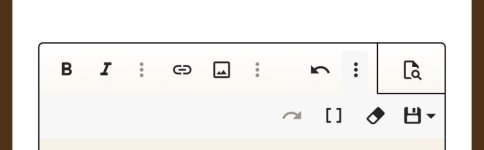
Grey is inactive:

Yes - photos or videos or text formatting, but you'd need to manually add the markup codes.So the [] would be used to post photos, but you need to use the photo code.

…if you know what you are doing.
There’s always a catch
I am am Android.Glad I have an Android

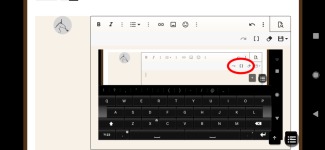
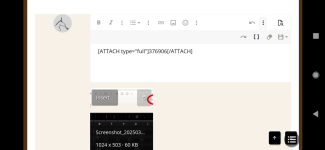
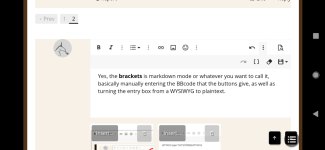
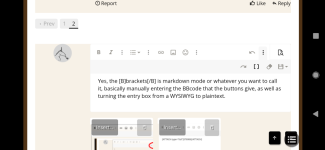
Yes, the brackets is markdown mode or whatever you want to call it, basically manually entering the BBcode that the buttons give, as well as turning the entry box from a WYSIWYG/rich text to plaintext... that's what the bracket button does.
Why have that? Because sometimes it can be difficult to place the code exactly where you want it in WYSIWYG mode.
Also, you can still add bracket code while in WYSIWYG and it work.
Why have that? Because sometimes it can be difficult to place the code exactly where you want it in WYSIWYG mode.
Also, you can still add bracket code while in WYSIWYG and it work.